UPI Deposits, Raja Game
A practical guide to upi deposits for raja game: the steps, the limits and the common mistakes.
What Is UPI Deposits?
UPI (Unified Payments Interface) deposits are the fastest way to add funds to your Raja Game account. UPI is a real-time payment system built and regulated by the National Payments Corporation of India (NPCI) and backed by the Reserve Bank of India. It links your bank account to a Virtual Payment Address (VPA), such as yourname@bankname, so you can send money directly without entering your full card details or net-banking credentials each time.
Because UPI works 24 hours a day, seven days a week, including public holidays, Raja Game players are not restricted to bank working hours when they want to top up their gaming wallet. A deposit triggered at 2 a.m. on a Sunday clears through the NPCI network in exactly the same way as one made on a Tuesday afternoon.
Supported UPI apps for Raja Game deposits include Google Pay (GPay), PhonePe, Paytm UPI, Amazon Pay UPI, BHIM, and any bank-issued UPI app such as iMobile (ICICI) or YONO SBI. If your bank is registered with NPCI and your UPI ID is active, it will work on the Raja Game deposit screen.
How UPI Deposits Works
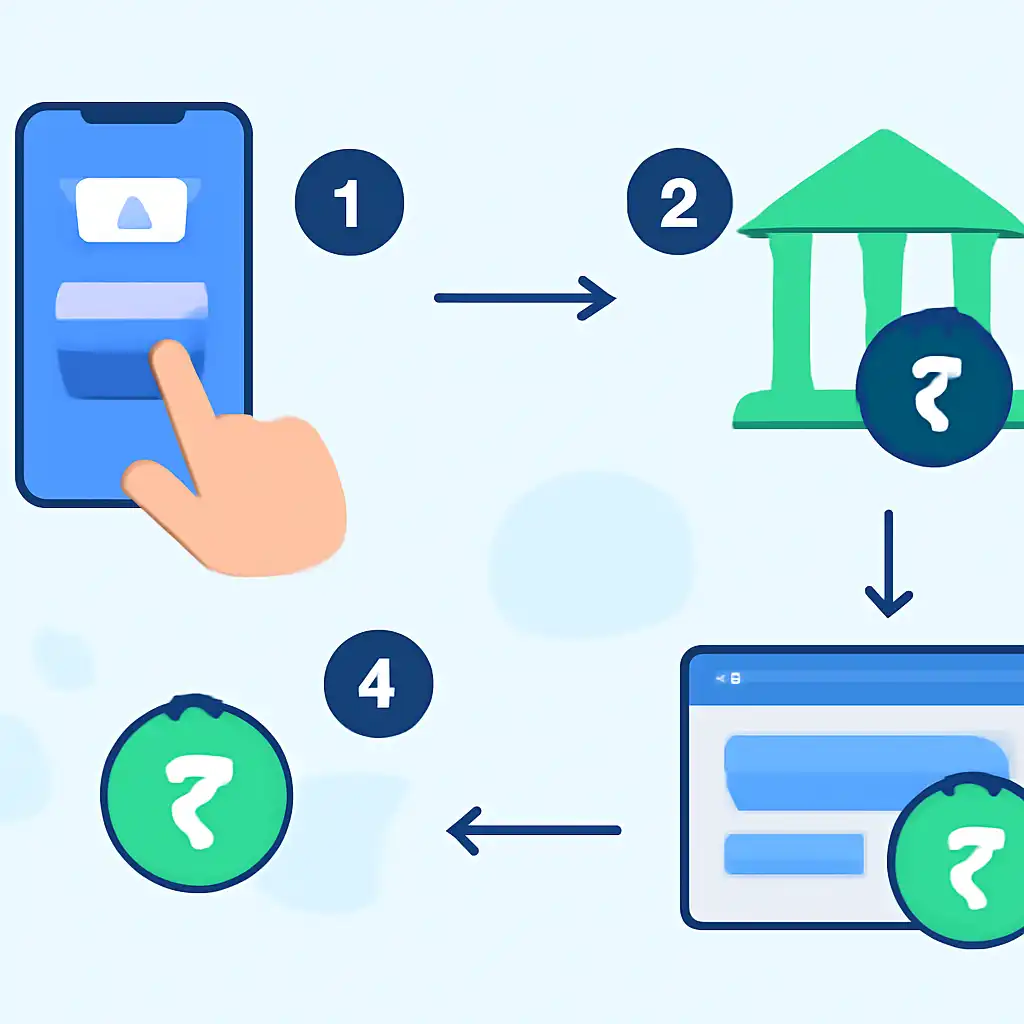
The deposit flow follows a short, standardised sequence. Understanding each step helps you complete a top-up without hesitation.
- Open the Raja Game cashier. Log in to your Raja Game account and navigate to the Wallet or Cashier section. Select Deposit and then choose UPI as your payment method.
- Enter the deposit amount. Type the amount you wish to add. Raja Game typically enforces a minimum deposit (commonly ₹100) and a maximum per transaction. Both figures are shown on the deposit screen at the time you place the request.
- Choose your UPI method. You may be presented with a QR code, a UPI deep-link button (which opens your installed UPI app directly), or a field where you type your own VPA and receive a collect request.
- Authorise in your UPI app. Switch to Google Pay, PhonePe, or whichever UPI app you use. If you scanned a QR code or tapped a deep-link, the payment details will already be pre-filled. Enter your 4- or 6-digit UPI PIN to approve the transaction. Your UPI PIN is set by you inside your bank's UPI app, Raja Game never sees or stores it.
- Transaction processing. NPCI routes the debit from your linked bank account to the Raja Game payment gateway. This step normally completes within a few seconds, though occasional network delays at the bank end can extend it to a few minutes.
- Wallet credited. Once the payment gateway confirms receipt from NPCI, Raja Game credits your wallet. You will see the updated balance when you refresh your wallet view or return to it after the transaction. For independent confirmation, open your bank's UPI app or passbook, the debit entry and UPI reference number appear there and serve as your official transaction record.
If a deposit appears to have debited from your bank but your Raja Game wallet has not updated after fifteen minutes, note the UPI transaction reference number shown in your bank's UPI app or SMS alert and contact Raja Game customer support with that reference. The NPCI UTR (Unique Transaction Reference) is the authoritative proof of payment recognised by both the bank and the platform.
UPI Deposits Common Questions
- Is there a fee for depositing via UPI on Raja Game?
- UPI transfers between bank accounts are free under NPCI rules. Raja Game does not add a processing surcharge on UPI deposits, though you should confirm this on the deposit screen before confirming, as platform fee policies can change.
- Which banks are supported?
- Any Indian bank that is live on the NPCI UPI network is supported. This covers virtually all scheduled commercial banks including SBI, HDFC, ICICI, Axis, Kotak, PNB, Bank of Baroda, Canara Bank, and hundreds of cooperative and regional rural banks. The current list of member banks is maintained on the official NPCI website at npci.org.in.
- Why did my UPI PIN fail?
- A UPI PIN failure usually means one of three things: the PIN was entered incorrectly, the PIN has been reset recently and you are using an old one, or your bank account linked to the UPI ID has insufficient funds. Three consecutive wrong PIN attempts will lock your UPI ID temporarily, your bank's UPI app or customer care can guide you through resetting it.
- Can I use a UPI ID linked to someone else's bank account?
- Raja Game's terms require that the payment method belongs to the account holder. Depositing from a third-party UPI ID may result in the transaction being flagged, the deposit being reversed, or the account being reviewed. Always use a UPI ID registered to your own name and bank account.
- What is the difference between a UPI QR code and a collect request?
- A QR code is a push payment, you initiate and approve the transfer from your UPI app by scanning the code. A collect request is a pull request sent to your UPI ID, your app asks you to approve an incoming request. Both outcomes are identical in terms of the money moving, but QR-based push payments are generally processed slightly faster because they do not wait for you to notice and accept an incoming request.
- My payment debited twice. What should I do?
- Open your bank's UPI app or log in to your bank's internet banking portal to verify how many debits actually occurred. Bank statements and the NPCI transaction history are the authoritative record, not notifications, which can occasionally duplicate on some devices. If a genuine double debit occurred, raise a dispute through your bank's grievance channel and simultaneously contact Raja Game support with both UTR numbers.
UPI Deposits on Mobile
The vast majority of Raja Game players deposit on a smartphone, and UPI is particularly well suited to mobile because the payment apps are phone-native. The following practices make the mobile deposit experience smoother.
Use deep-links when available
When the Raja Game deposit screen offers a button labelled Pay with GPay, Pay with PhonePe, or similar, tap it rather than copying a UPI ID manually. The deep-link passes the exact amount and VPA directly to your UPI app, eliminating the risk of a typing error in the amount or recipient address.
Keep your UPI app updated
Payment apps release security and compatibility patches frequently. An outdated version of Google Pay or PhonePe may fail to open correctly when triggered by a deep-link from another app. Enable automatic updates for your UPI app in the Google Play Store or Apple App Store.
Stable internet before you start
Begin a UPI deposit only when you have a stable mobile data or Wi-Fi connection. Switching networks mid-transaction, for example, moving from Wi-Fi to 4G as you walk out of range, can cause the confirmation callback from NPCI to be delayed or missed by the app. If this happens, wait five minutes, then check your bank's UPI transaction history for confirmation before retrying.
Screenshot the UPI reference number
Immediately after your UPI app shows a success screen, take a screenshot that captures the UTR or UPI reference number. This twelve-digit number is generated by NPCI and is unique to your transaction. It is the single most useful piece of information if you ever need to raise a deposit query with Raja Game support or your bank.
Avoid switching apps during authorisation
Some Android devices aggressively kill background processes. If you switch away from your UPI app before entering your PIN and tapping confirm, the app may close and the payment session may time out. Keep the UPI authorisation screen in the foreground until you see the success or failure result.
Check your bank's app for confirmation
For independent, authoritative confirmation that your deposit went through, open your bank's own mobile app or visit your bank's internet banking portal and review your UPI transaction history. The debit record there, including the merchant name and UTR, is the official proof of payment, separate from anything shown on the Raja Game interface.